
JSON-LD Author Schema Missing From Rich Results? Fix It
JSON-LD author schema drops silently from Google rich results when @id references do not resolve. Here are the 4 fixes, plus the August 2026 parser change.
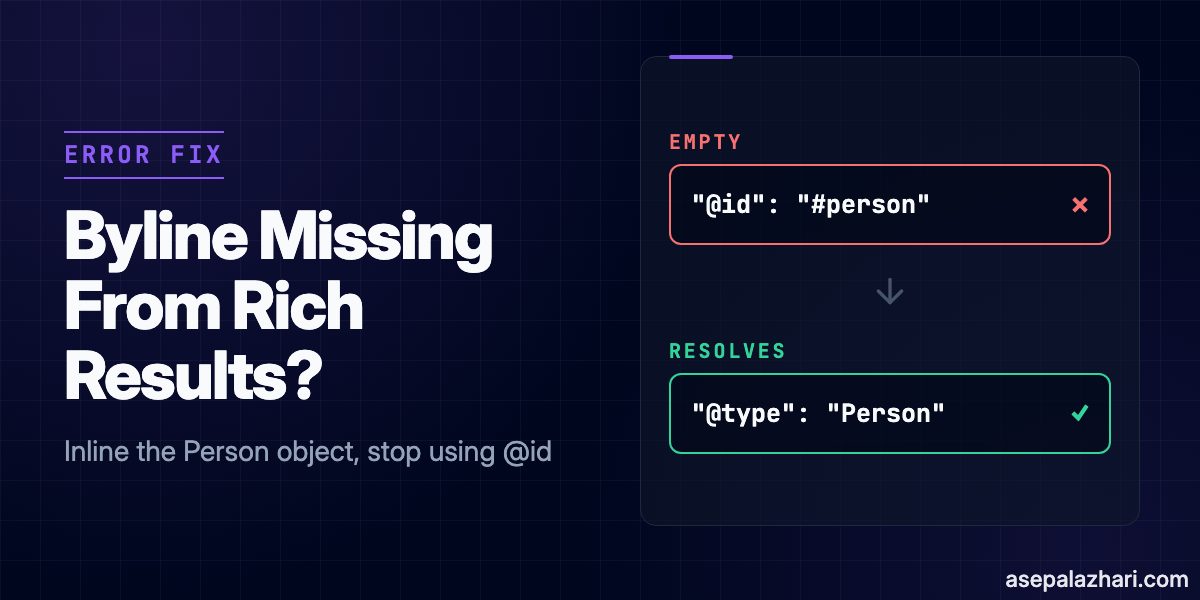
Most JSON-LD guides tell you to link your author with an @id reference so Google can merge every article under one entity. That advice is exactly what breaks author detection, and it fails silently. No error in Google Search Console, no warning in the Rich Results Test, the byline just quietly stops counting toward eligibility.
The short version: @id only works as a pointer, and a pointer only resolves if the node it names exists inside the same JSON-LD document. Point it at a Person node defined somewhere else, in another script block, on another page, in a sitemap-level graph, and Google reads the article as having an author with no name. Below are four schema bugs that cause this, in order of how often I have seen them, plus a fresh one Google introduced on August 20, 2026 that is worth checking even if your author markup is fine.
Quick Fix: Inline the Person Object
If you only fix one thing, fix this one. Stop referencing an external Person node by @id and inline the full object directly inside author.
// Before: breaks silently
{
  "@type": "Article",
  "author": { "@id": "https://example.com/#person-jane-doe" }
}

// After: self-contained, resolves every time
{
  "@type": "Article",
  "author": {
    "@type": "Person",
    "name": "Jane Doe",
    "url": "https://example.com/author/jane-doe",
    "sameAs": ["https://www.linkedin.com/in/janedoe"]
  }
}
An @id reference is just a label, not a database lookup. Google’s crawler does not fetch a separate page to resolve it. If the full Person object is not present somewhere in the same parsed document, the reference points at nothing, and nothing is what Google records for that author.
Why This Happens: Four Schema Bugs, One Symptom
| Bug | Symptom | Fix |
|---|---|---|
External @id for author | Author reads as empty, byline missing from rich results | Inline the Person object |
| Unencoded name in author URL | Malformed or truncated author profile URL | Percent-encode the name before interpolating it |
Organization reuses logo for image | Local Business rich result not eligible | Add a distinct image field |
Hardcoded @type on every post | Reviews and products lose their specific rich result type | Discriminate @type by content type |
Fix 2: Percent-Encode the Author Name
Author names with spaces, accents, or non-ASCII characters break when they get interpolated raw into a constructed URL field. A name like “José García” or “Nguyễn Văn” turns into an invalid URL segment the moment you template-string it in.
const authorUrl = `https://example.com/author/${encodeURIComponent(authorName)}`;encodeURIComponent is the one-line fix. Run it on the name before it goes into any url or sameAs field in the JSON-LD, not after.
Fix 3: Give Organization Its Own Image, Separate From Logo
Organization schema commonly reuses the same value for both logo and image. That works for the Organization knowledge panel, but it blocks eligibility for rich results that specifically require an image distinct from logo, most notably Local Business rich results.
{
  "@type": "Organization",
  "name": "Example Inc",
  "logo": "https://example.com/logo.png",
  "image": "https://example.com/office-photo.jpg"
}
Google’s own Organization structured data documentation lists image and logo as separate properties for a reason. Populate both, and point them at different assets.
Fix 4: Discriminate the Schema Type by Content
A single hardcoded @type: "Article" across every post throws away eligibility for the more specific rich result types. A product review needs Review with a reviewRating. A news post benefits from NewsArticle instead of plain Article. A comparison post that reviews a physical or digital product can carry Product alongside it.
function getSchemaType(post: { category: string; hasRating?: boolean }) {
  if (post.hasRating) return "Review";
  if (post.category === "news") return "NewsArticle";
  return "Article";
}
Map this once at the template level, driven by whatever category or content-type field your CMS already has, and every post starts emitting the schema type it actually qualifies for.
The August 2026 Change: Double-Escaped Entities No Longer Auto-Correct
This one is separate from the four bugs above, and it is new. On August 20, 2026, Google changed how Googlebot extracts JSON-LD: it now applies a single pass of HTML unescaping instead of resolving entities repeatedly. Gary Illyes confirmed the change comes from bringing the parser in line with the JSON specification, RFC 8259 section 7, which defines escaping once, not recursively.
Before the change, if your JSON-LD generator escaped a value twice, an ampersand written as & or a checkmark as a double-escaped entity, Googlebot silently unescaped it twice and still read the correct character. After the change, only one unescaping pass happens. A double-escaped entity now renders as literal garbage in the parsed value, or fails validation outright.
This risk sits almost entirely with layered systems, not a single hand-written script. The classic pattern: a CMS escapes a value for safe HTML output, then a separate plugin or template layer escapes the same value again when it serializes the JSON-LD block. Each layer is correct in isolation. Stacked, they double-escape.
The fix is to stop relying on double-escaping to begin with. Use standard JSON string escapes or Unicode hex escapes (the six characters backslash, u, 0, 0, 2, 6 for an ampersand) at the point where the value is serialized into JSON, and make sure nothing upstream HTML-escapes that same value a second time.
// Serialize with JSON.stringify, do not pre-HTML-escape the value first
const jsonLd = JSON.stringify({
  "@type": "Article",
  headline: rawTitle, // pass the raw string, let JSON.stringify escape it once
});
If you run a CMS, a plugin ecosystem, or any pipeline where more than one layer touches the same string before it becomes JSON-LD, audit it now. Sites least likely to be affected are ones where a single function builds and serializes the schema in one place.
How to Verify the Fix
Google Search Console will not always show an explicit error for a silently dropped author. Check it this way instead.
- Run the specific page through Google’s Rich Results Test and expand the detected item.
- Confirm the
authorfield shows a resolvedname, not an empty object or a bare@idstring. - In Search Console, open Search Appearance, then Rich Results, and look for the item type your page targets. A page that is not listed there at all, with zero errors, is often the silent case: it never became eligible in the first place.
- After deploying a fix, request indexing for the page, wait for the next crawl, then click Validate Fix in Search Console to confirm Google now reads it correctly.
Also Read: GEO: Get Cited by ChatGPT, Claude and Perplexity in 2026
Does Fixing This Guarantee a Rich Result?
No. Valid, resolvable structured data makes a page eligible, it does not force Google to display the enhanced result. Google decides display based on query intent and page quality signals on top of the schema being correct. Fixing these four bugs removes the silent failures that block eligibility in the first place, which is the part you actually control.
Also Read: IndexNow: Instant Search Engine Indexing for Your Website
FAQ
Does the August 2026 change affect FAQPage or HowTo schema too? Yes, it affects any JSON-LD value that was relying on repeated HTML unescaping, regardless of schema type. The fix is the same: escape once, at serialization, and stop double-escaping upstream.
Do I need to fix this if my site does not use NewsArticle or Review types? The @id and percent-encoding bugs apply to any author or Organization node regardless of the parent type, including plain Article. Check them even on a site that only ever uses one schema type.
How do I know if my CMS is affected by the double-escaping issue? Check the raw JSON-LD output in your page source for any HTML entity written out inside a JSON string, such as an escaped ampersand or quote mark that never got converted to its plain character. If you find one, something upstream is escaping the value before it reaches JSON serialization.
What to Check Right Now
Run your homepage and one article page through the Rich Results Test today, not after your next content update. If the author name resolves and the raw JSON-LD has no double-escaped entities, you are already clear on both fronts. If either one fails, the four fixes above are the actual causes, not a JavaScript rendering issue or a Search Console indexing delay, which is where most generic troubleshooting guides send you first.
![shadcn ScrollArea Not Scrolling in Dialog: Fix [2026]](https://cdn.asepalazhari.com/images/articles/web-development/shadcn-scrollarea-not-scrolling-dialog-fix.jpeg)