
Fix bwrap Error on Ubuntu 24.04 in Docker for Codex CLI
Codex CLI fails with bwrap namespace error on Ubuntu 24.04 Docker containers. Learn the exact cause and three working fixes to get file patching running again.
Fix bwrap Error on Ubuntu 24.04 Docker for Codex CLI
I was deep in a coding session, running Codex CLI inside an Ubuntu 24.04 Docker container, when it hit me with this:
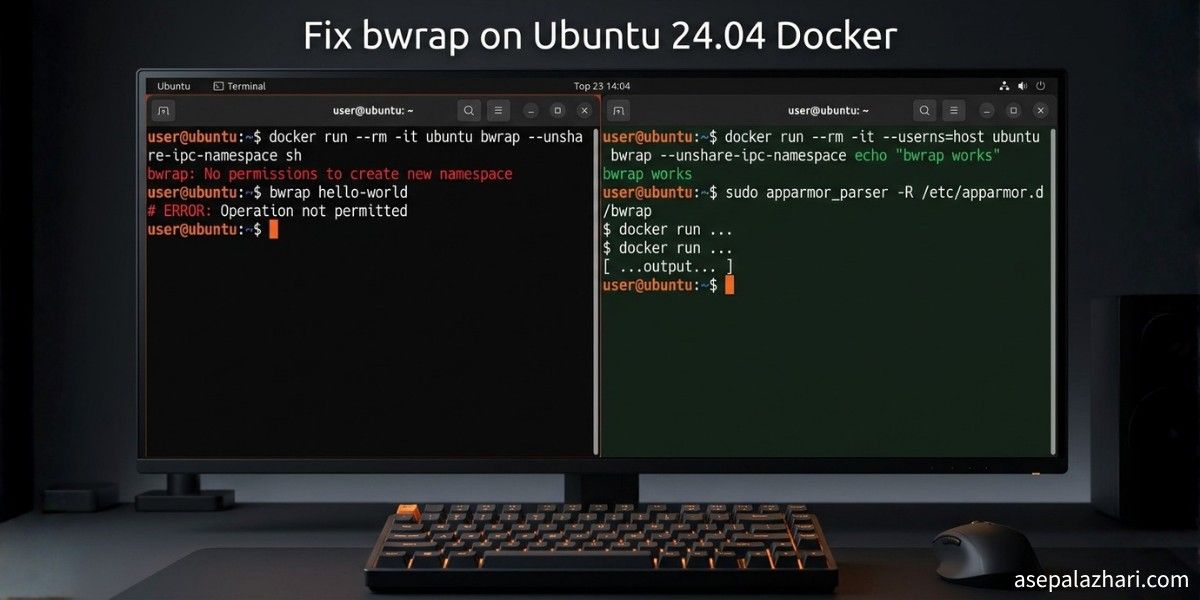
bwrap: No permissions to create a new namespace, likely because the kernel does not
allow non-privileged user namespaces. On e.g. debian this can be enabled with
'sysctl kernel.unprivileged_userns_clone=1'.
Then right after that, Codex said it could not find system bubblewrap on PATH and would use the vendored version instead. File patching stopped working entirely. After a few rounds of trying the obvious fixes and failing, I finally figured out the real cause. This post walks through exactly what happened, why the common fixes did not work, and what actually solved it.
Why This Happens on Ubuntu 24.04
The error message points you toward an old Debian sysctl fix. That is misleading. On Ubuntu 24.04, the restriction comes from AppArmor, not from kernel.unprivileged_userns_clone.
Codex CLI uses bubblewrap (bwrap) to sandbox file patches for security. bubblewrap creates user namespaces to isolate file operations. Ubuntu 24.04 introduced a stricter AppArmor policy that blocks /usr/bin/bwrap from creating unprivileged namespaces, even for root users inside Docker containers.
Docker containers share the host kernel. That means the AppArmor policy on the host applies inside the container too. This is why commands that work fine on an older Ubuntu or Debian image suddenly break on Ubuntu 24.04.
Running sudo sysctl -w kernel.unprivileged_userns_clone=1 inside the container gives you a read-only filesystem error because Docker containers cannot change kernel parameters. Running sudo sysctl -w kernel.apparmor_restrict_unprivileged_userns=0 fails entirely because that sysctl key does not exist on most host kernels. Neither of these targets the actual problem.
Three Fixes That Work
Fix 1: Run the Container with AppArmor Unconfined (Recommended)
This is the cleanest approach. When you start the container, pass the AppArmor security option:
docker run --security-opt apparmor=unconfined \
  -v $(pwd):/workspace \
  -it ubuntu:24.04 bash
For Docker Compose, add this to your service:
services:
    your-service:
        image: ubuntu:24.04
        security_opt:
            - apparmor:unconfined
        volumes:
            - .:/workspace
This removes the AppArmor restriction only for this specific container. It does not affect other containers or the host. Once inside, install bubblewrap and Codex will find it automatically:
apt-get update && apt-get install -y bubblewrapNo chmod tricks needed. Codex CLI will use the system bubblewrap and patching works normally.
Fix 2: Make bwrap Setuid Inside the Container
If you cannot restart the container or change the docker run command, this workaround fixes it from inside. Run as root inside the container:
# Install bubblewrap first
apt-get update && apt-get install -y bubblewrap

# Make bwrap run as root for namespace creation
chmod u+s /usr/bin/bwrap

# Verify the setuid bit is set
ls -l /usr/bin/bwrap
# Expected: -rwsr-xr-x ... /usr/bin/bwrap
The s in the permission string confirms the setuid bit is active. This makes bwrap use root privileges specifically for namespace creation, which bypasses the AppArmor restriction. It is a well-known workaround on Ubuntu 24.04 and works reliably when the container is already running as root.
Fix 3: Add to Your Dockerfile
If you are building a custom image and want every container to work out of the box:
FROM ubuntu:24.04

RUN apt-get update && apt-get install -y bubblewrap && \
    chmod u+s /usr/bin/bwrap && \
    rm -rf /var/lib/apt/lists/*
This bakes the fix into the image so you never have to think about it again. Combine this with --security-opt apparmor=unconfined when running the container for the most reliable setup.
Also Read: Why I Chose Codex CLI as Claude Code Alternative: 2025 Review
Troubleshooting: What If apt-get Fails Too
If you are not running as root inside the container, apt-get will fail with a permission denied error on the lock file:
E: Could not open lock file /var/lib/apt/lists/lock - open (13: Permission denied)Check who you are first:
whoamiIf you are not root, clear stuck lock files and run as sudo:
sudo rm -f /var/lib/apt/lists/lock /var/lib/dpkg/lock-frontend /var/lib/dpkg/lock
sudo apt-get update && sudo apt-get install -y bubblewrap
If sudo is not available and you cannot restart the container, find the vendored bubblewrap that Codex ships with and apply setuid to that instead:
find / -name bwrap 2>/dev/null | grep -i codex
# Then chmod u+s on whatever path it returns
Verifying the Fix Works
After applying any of the fixes above, run a quick manual test to confirm bubblewrap can create namespaces:
bwrap --ro-bind / / --dev /dev --proc /proc --unshare-pid -- echo "bwrap works"If this prints “bwrap works” without errors, Codex CLI patching will work. If it still fails, check that the setuid bit is set with ls -l /usr/bin/bwrap and that you see -rwsr-xr-x in the output.
Also Read: Why Docker Buildx Changed My CI/CD Game Forever
Why Not Just Use —privileged
Running Docker with --privileged does fix the issue. It gives the container full access to the host system, bypassing virtually all security restrictions. That is exactly why you should avoid it unless you have a specific reason. The --security-opt apparmor=unconfined flag is the targeted fix. It removes only the AppArmor restriction without granting the container elevated capabilities beyond what it needs.
Quick Reference
If you want the short version of all three options:
Option one is for new containers. Add --security-opt apparmor=unconfined to your docker run command or security_opt: [apparmor:unconfined] to Docker Compose. Then install bubblewrap normally.
Option two is for running containers you cannot restart. Run apt-get install -y bubblewrap followed by chmod u+s /usr/bin/bwrap as root inside the container.
Option three is for Dockerfile builds. Add the bubblewrap install and setuid step to your image so it is always ready.
The root cause in all cases is Ubuntu 24.04’s AppArmor policy blocking unprivileged namespace creation for bwrap. The fix is either removing that restriction at the container level or giving bwrap the setuid bit so it can create namespaces as root.